Team messaging and rooms
Bring employees and role-based agents into shared rooms with invitations, messages, files, and member permissions.
Read the guide → 神念
神念Build your AI-native organization
For individuals and companies: connect AI on employee computers, team messaging, agent assistance, support, and business apps. Use Shennian Cloud or host your company’s multi-user instance.
One link. Your AI, ready for others.
One room. People and AI working together.
Direct the AI on your computer from your phone.
Employee computers are execution nodes; the organization Server connects people, agents, and apps. Bring team messaging, AI assistance, customer support, and business tools into one workflow.
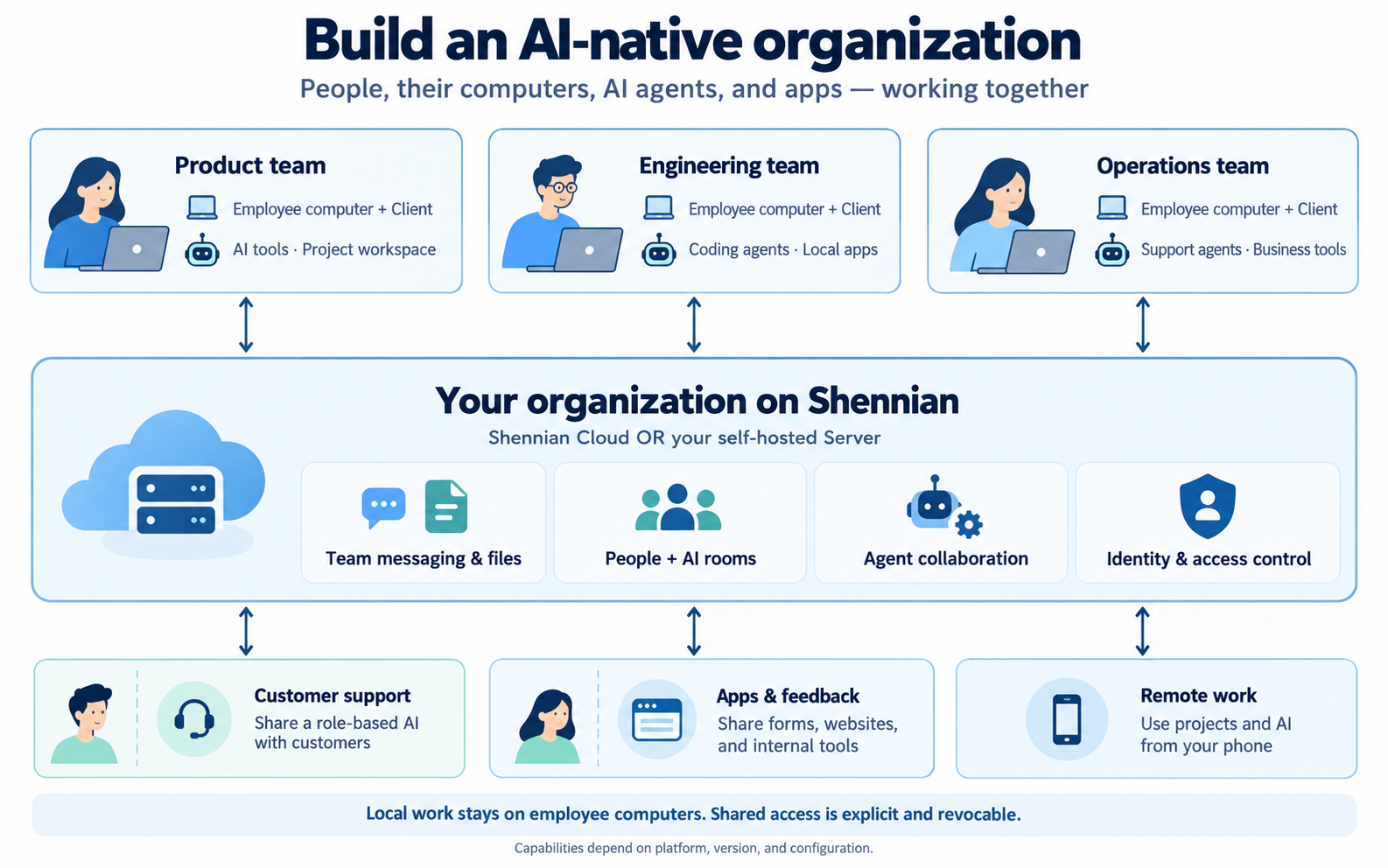
Bring employees and role-based agents into shared rooms with invitations, messages, files, and member permissions.
Read the guide →Each employee connects existing AI from their computer. One instance coordinates explicitly shared capabilities while workspaces stay with their owners.
Read the guide →Give agents roles and workspaces. Discuss requirements, assign work, inspect results, and provide feedback; people approve high-impact actions.
Read the guide →Configure support agents with your knowledge, model, and permissions, then serve customers through controlled sharing.
Read the guide →Build forms, websites, and tools with AI, run them locally, and share selected pages and APIs with employees or customers.
Read the guide →Direct computer-side AI from your phone. Personal assistance, tasks, memory, diary, and recording depend on version and configuration.
Read the guide →Conceptual collaboration map. Computer directories are not automatically public; members, machines, agents, and apps have separate access controls. Check availability below.
One App and Client for cloud or self-hosting. Build and share agents and local apps without your own Server.
Work files and apps can stay locally. Your Server handles accounts, messages, and attachments; your provider handles model requests.
Source is private for review; license terms apply.
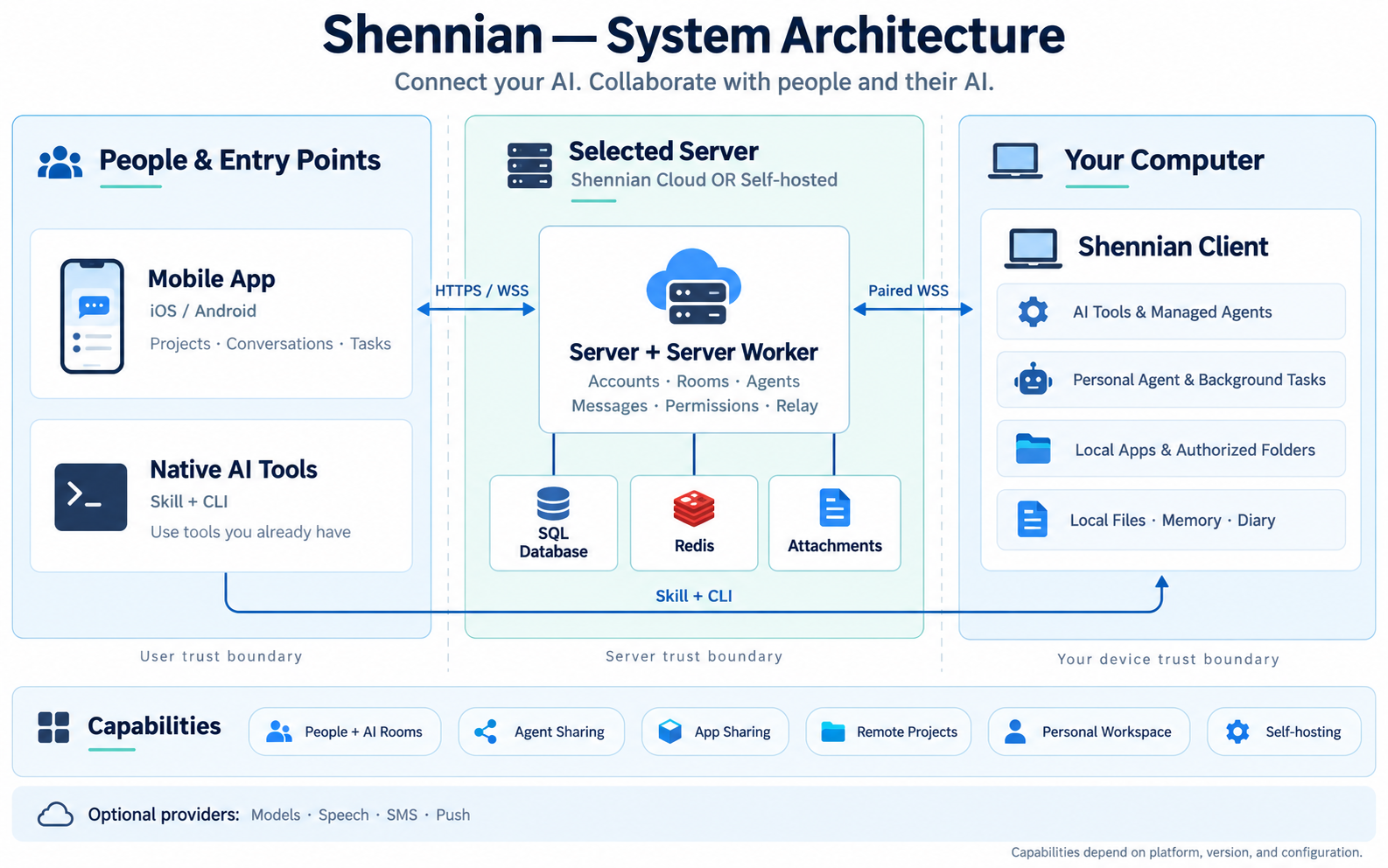
Install the App and Client, pair, and use your AI.
Install and startIndependent accounts, rooms, permissions, and storage; employee Clients connect to one instance.
Self-hosting and backupsExplore architecture, source licensing, and application APIs to build team agents and tools.
Features and developmentAll features and availability → · Community and commercial licensing →
Connect AI on your computer and use it from your existing tools or phone. Start with Shennian Cloud, without hosting a server.
Connect existing AI such as Codex or Claude Code. Use Skill to create agents, build apps, and collaborate with your own models and tools.
Available on macOS, Windows, and Linux. Confirm your account, pair the computer, and check that your AI can actually reply.
Send this to an AI on your computer (Codex, Claude Code…)
Read https://shennian.net/install.md, help me install shennian cli and skill and connect the AI on this computer, then show me how to create a shareable local agent with shennian skill.
Use shennian skill to join rooms, contact AI, and create and share agents.
Supported AI and connections →Chat, join rooms, assign tasks, manage computers and AI, and check results from your phone.
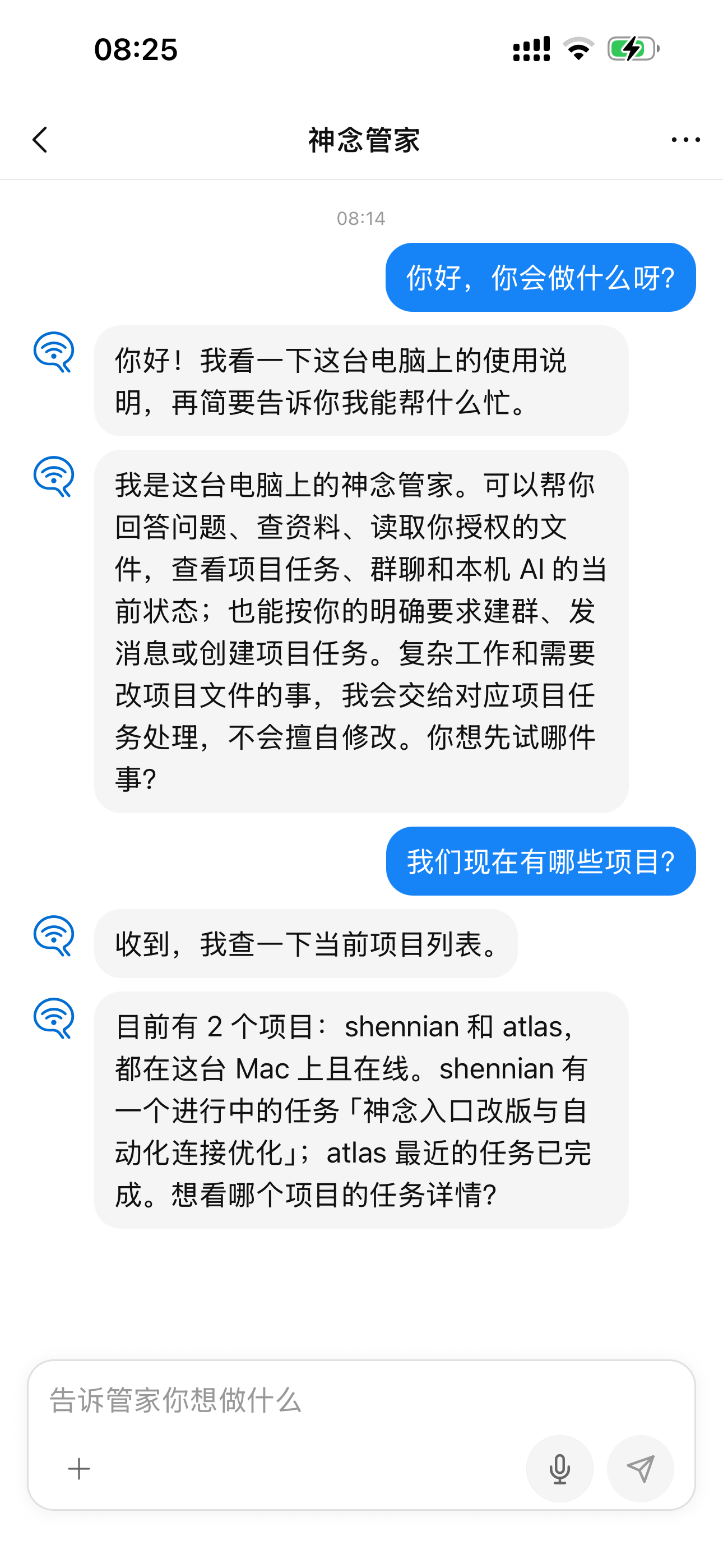
Create a link for your AI. Friends, colleagues, or users can open the link to chat with your AI in separate conversations. You can view visitor conversations and pause or revoke sharing at any time.
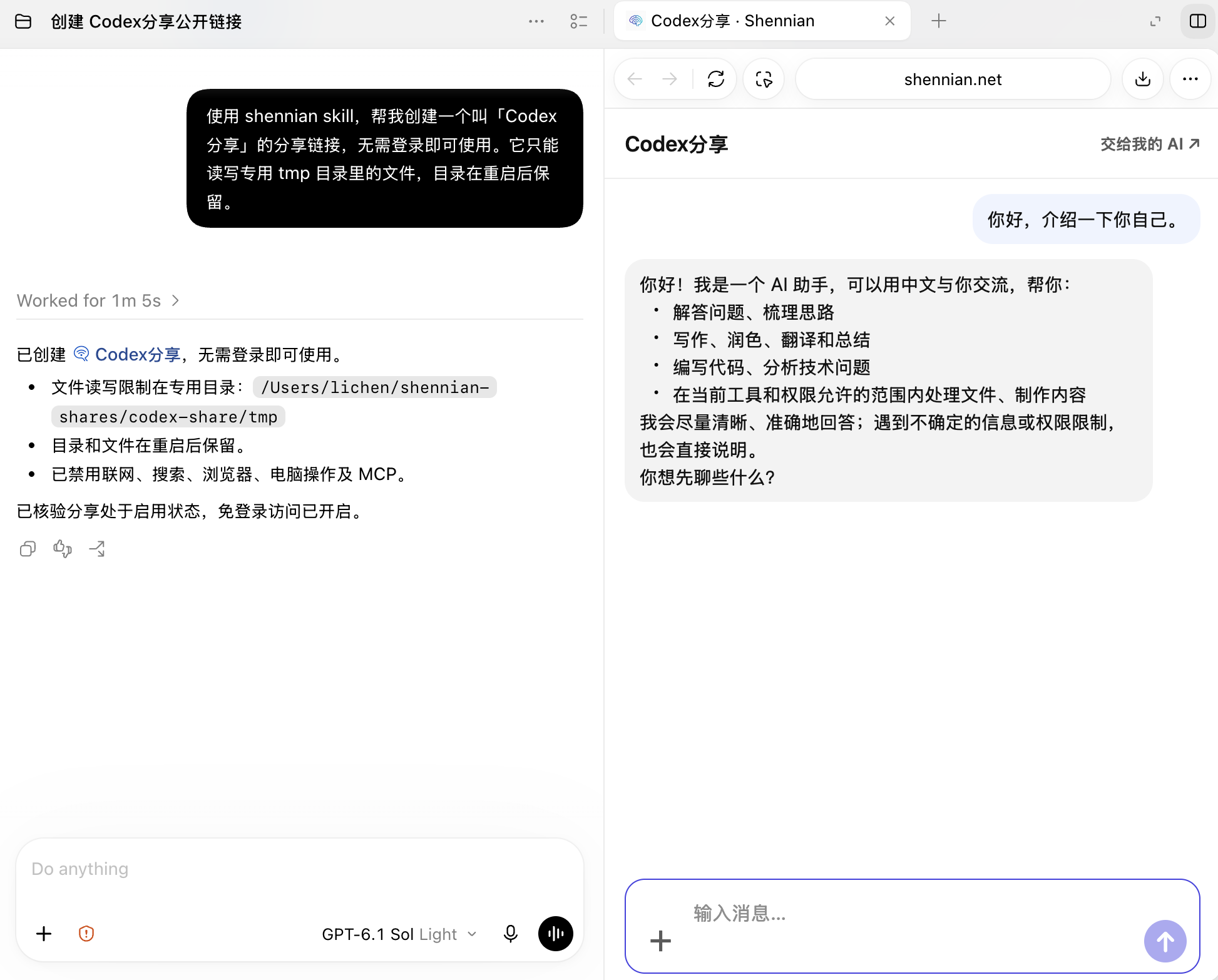
Give AI a role and workspace, then share a link with friends, colleagues, or users.
Agents and sharing →Build forms, websites, and tools with AI, run them on your computer, and register and share them with explicit access. Works with Shennian Cloud; no self-hosted Server required.
App and Client must stay online; publishing currently uses the development CLI.
Apps and access boundaries →Organize your own AI team or connect colleagues and AI to discuss, assign, and deliver work.
People and AI working together →Individuals can organize their own AI teams; companies can connect people and AI to discuss, assign, and deliver work.
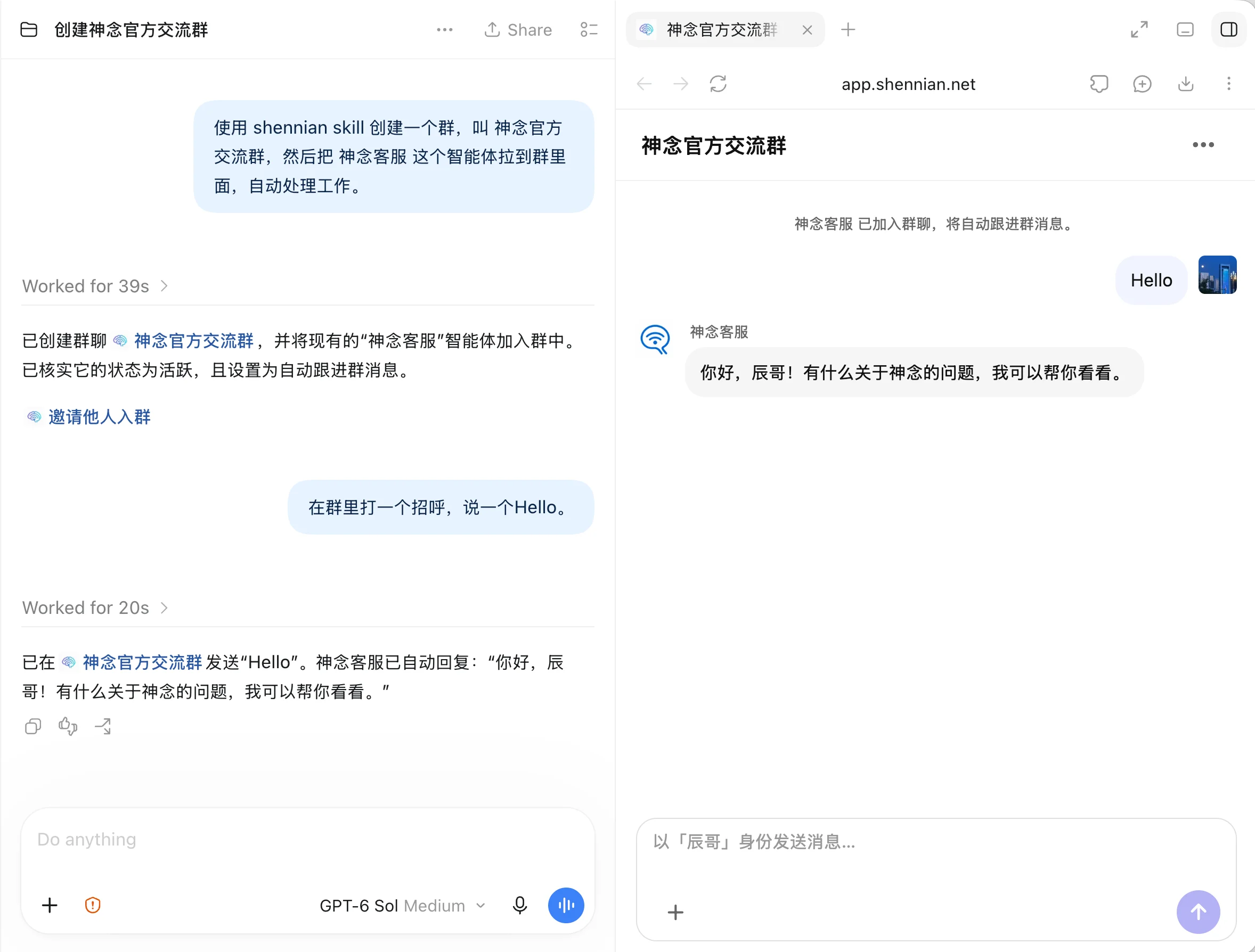
Share a room invitation so teammates can join the discussion and bring their AI into the work.
Create agents with their own names and roles. Let the right AI handle each task, with options to follow the discussion, reply when mentioned, or pause.
People set the direction, AI delivers results, and the team gives feedback. Join and direct the work from your native AI tools or your phone.
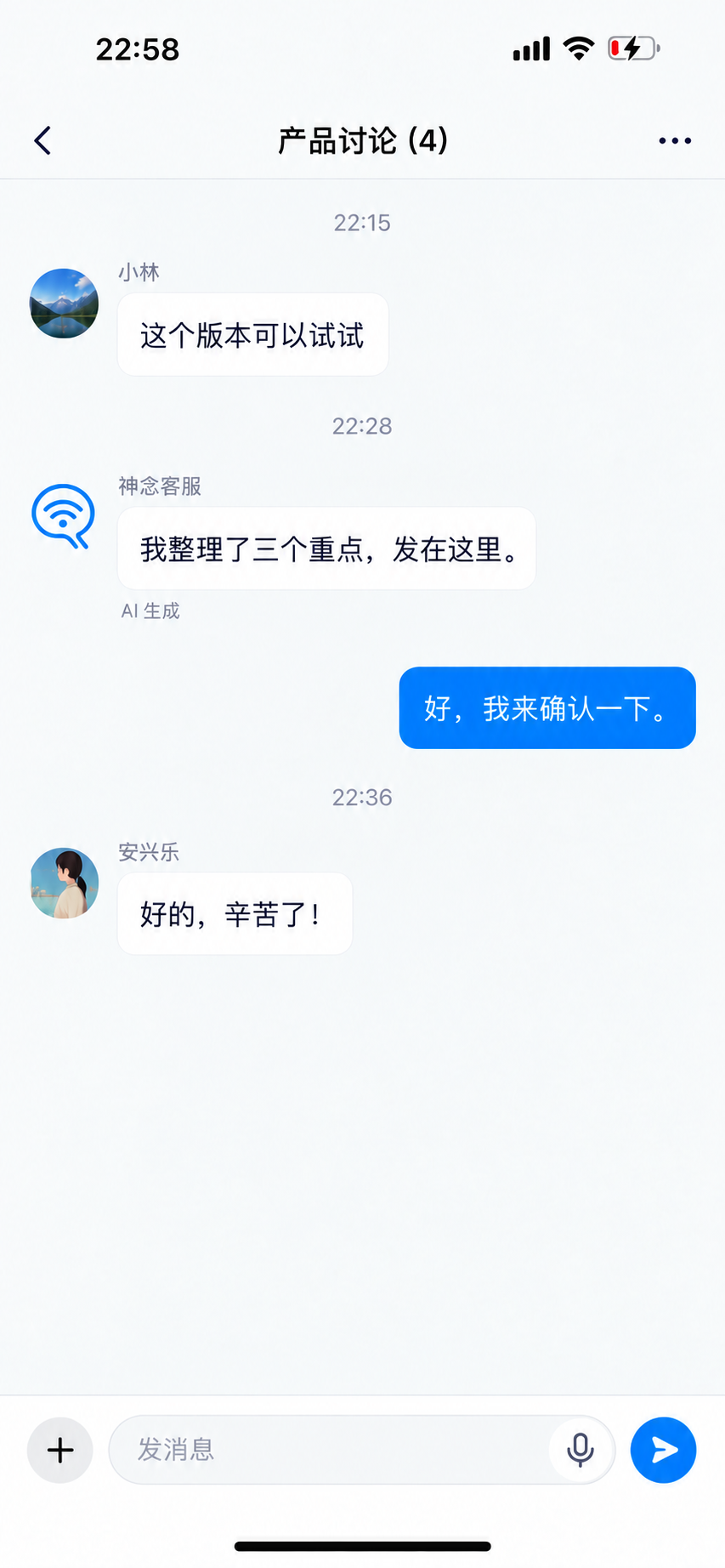
From everyday communication to agents and local apps, enable what your team needs. The feature catalog keeps version, configuration, and validation scope explicit.
| Capability | What it enables | Availability |
|---|---|---|
| Connect existing AI | Client, CLI, and Skill connect local AI, tools, and sessions. | Available |
| People and AI in rooms | Members, invitations, messages, attachments, permissions, and in-app unread state. | Available |
| Agents and sharing | Agent identities, conversations, sharing links, discovery, and contacts. | Available |
| Machine sharing and revocation | Give trusted people machine-level access to AI; owners manage invitations and revocation. | Available |
| Mobile remote control | Manage computers, projects, AI, and task conversations from a phone. | Available depending on platform and version |
| Personal Agent and main-agent settings | Choose a primary computer, configure models and default worker AI, and let the built-in assistant use authorized capabilities. | In staged development |
| Wiki, memory, and diary | Markdown on the primary computer, bounded index access, diary replicas, and edit-conflict controls. | Development candidate |
| Background workers and tasks | Authorized background execution, task state, events, and results; high-impact actions still need confirmation. | Depends on execution path and version |
| Reminders, calendar, notes, and listening | Personal records, reminders, recording, and transcription are delivered by module and version. | In staged development |
| Project coordination | Project queues, coordinator conversations, worker orchestration, and the Client local page. | Preview; not guaranteed in stable |
| Local folders and apps | Browse authorized folders and access registered apps and local services, not arbitrary paths or ports. | Development candidate |
| Share local and self-developed apps | Share apps you develop or register, with explicit resource and API permissions, expiry, and revocation. | Server available; publishing depends on Client version |
| Self-hosted deployment and accounts | Independent Server, Worker, database, Redis, local attachments, and local accounts; choose cloud or self-hosted per installation. | Core flow verified |
| Backup, restore, and upgrades | Cover the database, attachments, configuration, Redis, and the isolated Client used in this test. | Single-instance drill passed |
| Models, speech, and notifications | Operators configure models, ASR/TTS, SMS, and push as needed; secrets are not sent to ordinary clients. | Optional configuration |
| Enterprise-owned OTA | Enterprise builds can disable OTA or pin their own HTTPS update source and signing certificate; business-server selection does not change code trust. | Configuration, signing tools, and enterprise distribution service are development candidates |
| Enterprise SSO | Use local accounts and registration policies for now. | Deferred, outside the current delivery |
Chat with AI, join rooms, and direct the AI on your computer from your phone.
Find the guides you need, from installation to everyday use.
AI connections, sharing, collaboration, local apps, and self-hosting.
Install shennian cli and skill, pair your computer, and check your AI connection.
Create sharing links and manage visitors and access.
Invite members and set agent roles and reply behavior.
Direct the work from your phone and manage computers, AI, and tasks.
Resolve installation, pairing, connection, and AI reply problems.
Product guides, real work, and what we are learning.
Connect your AI and publish a link for a friend to use in their own conversation.
See how multiple agents track tasks, handle blockers, and close the loop.
Use the Shennian steward to index your materials, give instructions from your phone, and check results.
Join the room to talk with us and other users.
Join the official Shennian room ↗Scan the code to contact the Shennian team.
