Connect existing AI
Client, CLI, and Skill connect local AI, tools, and sessions.
Status: Available
Self-hosted: Native Pi verified; check other tools individually.
 神念
神念Explore what Shennian can do, from connecting your first AI to sharing and teamwork.
Shennian helps you build your Personal Agent and your company’s AI-native organization. Client connects your existing AI on your computer. The mobile app provides full management and control. Public links let visitors talk to one AI; room links bring people and AI together.
Create a link for an AI with a defined role and manage visitor access and conversations.
Share apps from your computer with explicit resource and API permissions.
Invite people and AI to discuss work, assign tasks, and review results.
Manage computers, projects, and conversations, and direct work remotely.
Check project progress, read authorized materials, and arrange tasks.
Find public AI and keep the connections you use.
Let trusted people use AI on a computer.
Agents in Shennian have their own names, roles, computers, and working directories. Connected AI performs the work. Third-party AI installation, sign-in, costs, and limits follow the provider’s rules.
The shared App, Client, Server, and Worker support Docker self-hosting, multiple local accounts, and independent storage. Features depend on installed versions and instance configuration. The GitHub repository is private during preparation; usage follows the license terms and written authorization.
GitHub · CosmosShadow/shennian (private) →Use Shennian Cloud without hosting a Server. Get the mobile App, install Client and Skill on your computer, pair, and verify one AI reply.
Get the mobile App · Install Client / Skill · Cloud quick start · All user guides
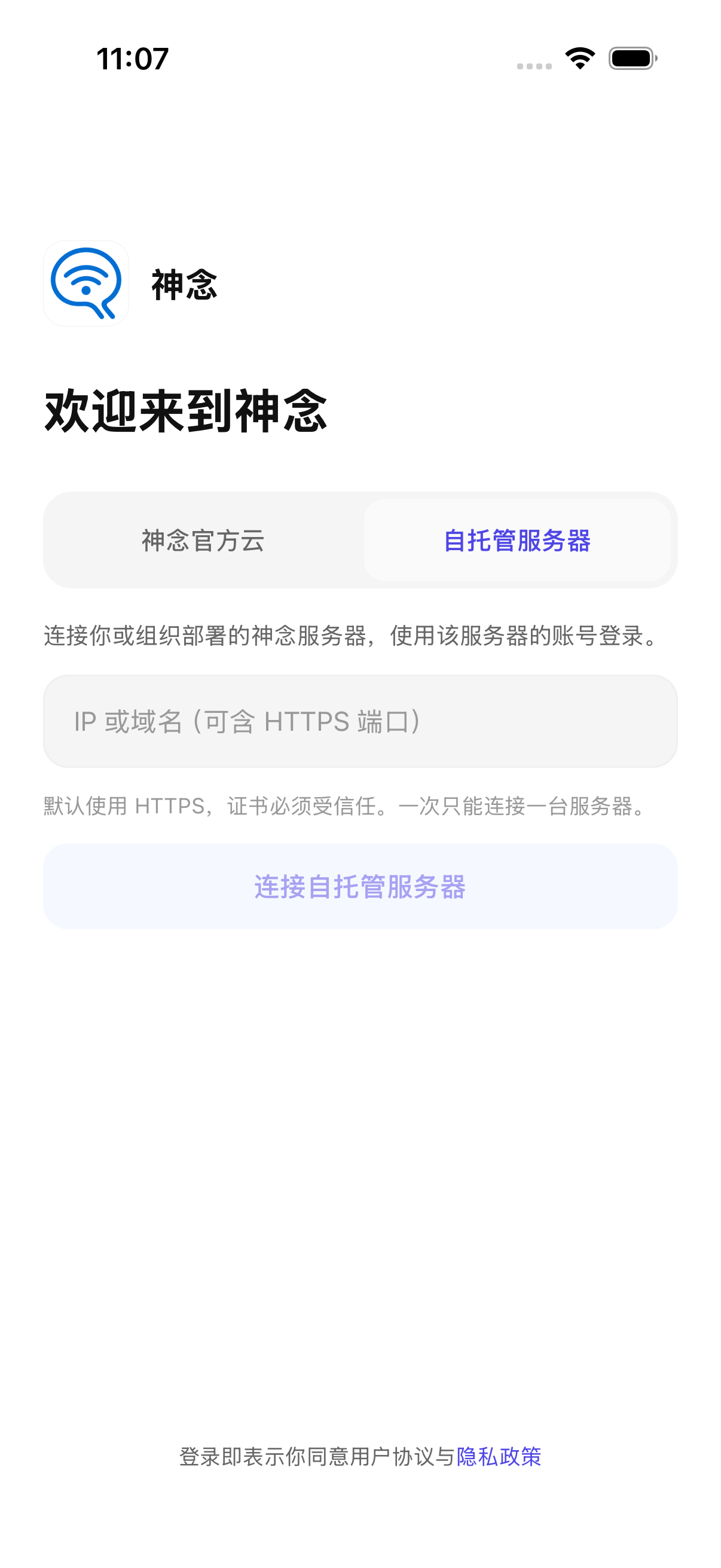
Choose Shennian Cloud or Self-hosted server on the login screen. Enter an IP or domain, verify trusted HTTPS and instance identity, then sign in or register according to the operator’s policy. Account fields appear only after connection. Bound installations cannot simply switch servers. Use compatible App, Client and Server versions; check the user guide for platform release status.
Operators deploy independent Server, Worker, database, Redis, and persistent attachment storage. Client on the computer connects to that same instance, pairs, and uses the owner’s AI configuration. One model provider is enough to test the core flow without SMS, speech, or push.
Each installation connects to one active Server, without mixing cloud and company instances. Server backups do not include memory, diary, or workspaces on other computers; back up each Client too. HTTPS/WSS encrypts transport, not end to end.
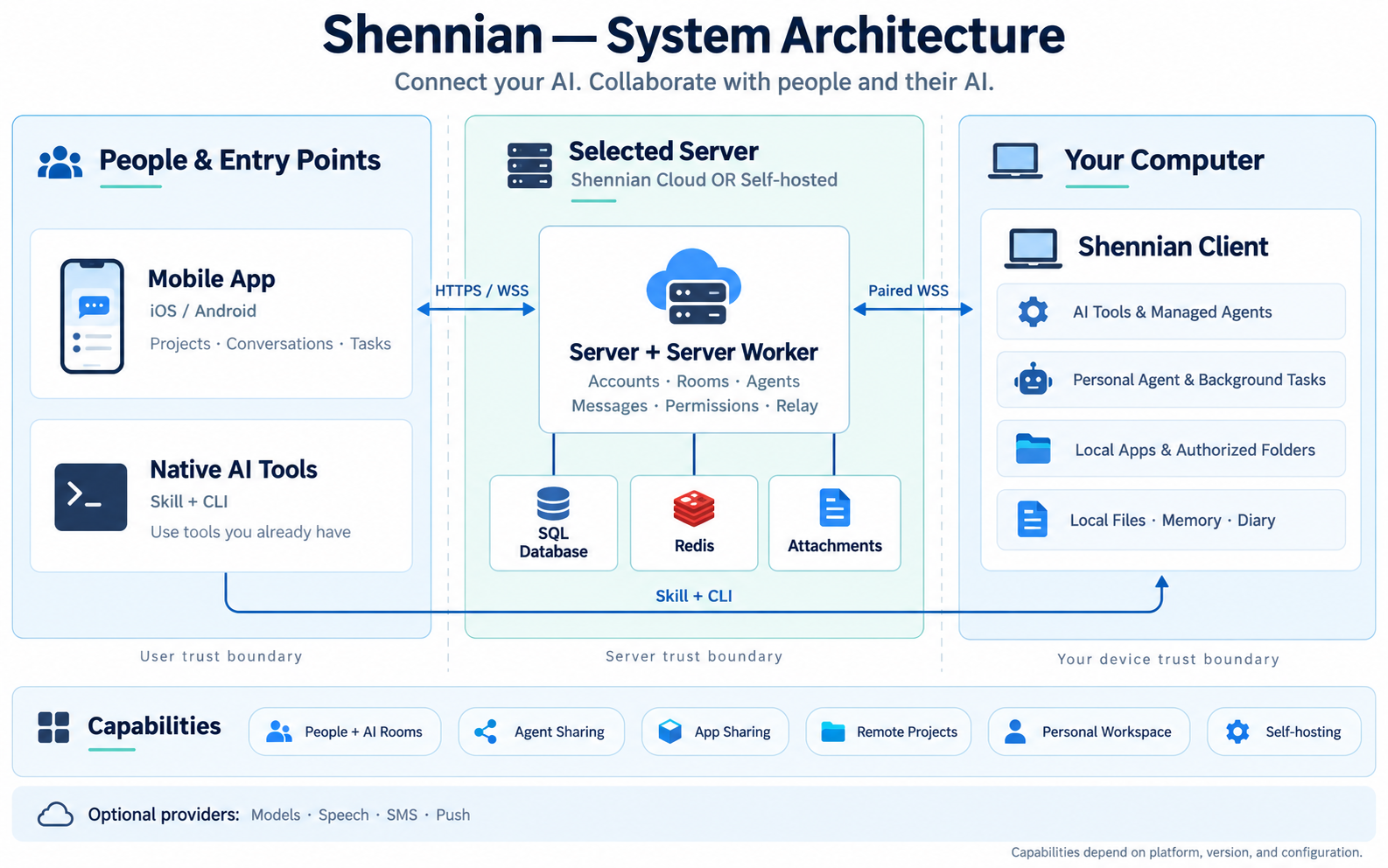
Personal Agent, primary-computer settings, wiki/memory, diary, and workers have separate data and permission boundaries. A real managed-agent reply does not validate the built-in Personal Agent or every personal feature.
This list separates product capabilities, development candidates, and this self-hosted acceptance run. Check your installed version, instance capabilities, and operator settings; a framework map does not mean everything is released.
Client, CLI, and Skill connect local AI, tools, and sessions.
Status: Available
Self-hosted: Native Pi verified; check other tools individually.
Members, invitations, messages, attachments, permissions, and in-app unread state.
Status: Available
Self-hosted: Two-user API, access boundaries, and attachments verified.
Agent identities, conversations, sharing links, discovery, and contacts.
Status: Available
Self-hosted: Managed-agent conversations and history verified; sharing, discovery, and contacts await dedicated checks.
Give trusted people machine-level access to AI; owners manage invitations and revocation.
Status: Available
Self-hosted: Dedicated self-hosted acceptance pending; machine-level trust is not a file sandbox.
Manage computers, projects, AI, and task conversations from a phone.
Status: Available depending on platform and version
Self-hosted: iOS development build passed address entry, sign-up, pairing, and real replies; Android and physical devices remain unverified.
Choose a primary computer, configure models and default worker AI, and let the built-in assistant use authorized capabilities.
Status: In staged development
Self-hosted: Built-in personal-agent self-hosted acceptance is incomplete; ordinary Pi replies are not a substitute.
Markdown on the primary computer, bounded index access, diary replicas, and edit-conflict controls.
Status: Development candidate
Self-hosted: Dedicated acceptance pending; not a full cloud wiki or vector knowledge base.
Authorized background execution, task state, events, and results; high-impact actions still need confirmation.
Status: Depends on execution path and version
Self-hosted: Basic durable-queue recovery verified; Personal Agent workers need separate acceptance.
Personal records, reminders, recording, and transcription are delivered by module and version.
Status: In staged development
Self-hosted: Not covered by this acceptance run; speech providers were not configured.
Project queues, coordinator conversations, worker orchestration, and the Client local page.
Status: Preview; not guaranteed in stable
Self-hosted: Controlled official-cloud iOS and Client flows verified; no dedicated self-hosted acceptance.
Browse authorized folders and access registered apps and local services, not arbitrary paths or ports.
Status: Development candidate
Self-hosted: Dedicated acceptance pending.
Share apps you develop or register, with explicit resource and API permissions, expiry, and revocation.
Status: Server available; publishing depends on Client version
Self-hosted: The app and Client must stay online. Publishing currently uses the development CLI; no mobile sharing menu yet.
Independent Server, Worker, database, Redis, local attachments, and local accounts; choose cloud or self-hosted per installation.
Status: Core flow verified
Self-hosted: Shared App source, independent Docker builds, formal migrations, instance binding, and model replies verified.
Cover the database, attachments, configuration, Redis, and the isolated Client used in this test.
Status: Single-instance drill passed
Self-hosted: Encrypted backup, isolated restore, and one image-pair upgrade/rollback passed; not arbitrary version compatibility.
Operators configure models, ASR/TTS, SMS, and push as needed; secrets are not sent to ordinary clients.
Status: Optional configuration
Self-hosted: Only DashScope qwen-plus configured; speech, SMS, and push disabled; missing-configuration messaging needs further UI work.
Enterprise builds can disable OTA or pin their own HTTPS update source and signing certificate; business-server selection does not change code trust.
Status: Configuration, signing tools, and enterprise distribution service are development candidates
Self-hosted: Configuration isolation, signatures/tampering, channel/runtime/platform separation, and publishing tools tested; enterprise native-shell upgrade/rollback remains unverified.
Use local accounts and registration policies for now.
Status: Deferred, outside the current delivery
Self-hosted: Not implemented and not a current acceptance requirement.
Run and register your own web app, tool, or form with Client, then explicitly publish a share. Visitors can use the resources you expose, without access to your computer, other apps, or arbitrary files.
Shares specify allowed GET resources and POST APIs, with expiry and revocation. The app, Client, and computer must stay online. The app stores its own business data; this is not cloud static hosting. Apps accepting writes must validate inputs and enforce business permissions.
Server supports this flow. Publishing and revocation currently use the development CLI; stable CLI commands and a mobile sharing menu depend on their actual releases. Source availability does not imply every client already has a publishing entry.
This policy applies to the community source distribution. Use of the supplied source follows its accompanying LICENSE. This summary does not replace the license or a separate written agreement. This restricted business model is source-available, not a claim of OSI approval.
Internal use by one organization with up to 20 enabled human accounts, retaining Shennian branding, logo, and copyright displays. Code may be modified within the license terms.
Count enabled human users of this system, not all company colleagues. Exclude agents, bots, and disabled accounts. Deduplicate devices for the same person and aggregate deployments of the same organization; splitting instances does not multiply the allowance.
Commercial authorization is required if usage exceeds 20 people OR if Shennian interface branding, logo, or copyright displays are removed, replaced, or hidden. Authorization is negotiated annually per organization; organization scope, user limits, term, and white-label rights are agreed in writing, not purchased seat by seat.
Commercial hosting for third parties, multi-customer services, white-label distribution, and resale require separately negotiated authorization, outside ordinary internal-use authorization.
White-label rights cover only the agreed Shennian interface displays, not removal of third-party licenses, dependency attribution, or source copyright notices required by law or applicable terms.
Organizations in China can request a quote through WeCom. This license includes no technical-service commitment for deployment, migration, training, customization, or response times. No fixed public price, lifetime updates, or unlimited services are promised.
Purchasers receive proof identifying the organization, reference number, term, scope, and white-label rights. No activation key, online licensing check, or member-data reporting is required, and expiry does not automatically lock the system or delete data. Lack of a technical lock does not make commercial rights perpetual; renew or return to the free permitted scope when the term ends.
The mobile app connects and operates the system; enterprise Server authorization is not sold through iOS in-app purchases. The same public code serves all regions with Chinese and English documentation. International commercial requests are assessed manually, without automated checkout or a global delivery commitment. Until a business email is confirmed, use the website contact entry.
Contact the team via WeCom →To use your own AI, start on the computer that runs it. If you receive an AI link or a room invitation, start with that link.
Send this to an AI on your computer (Codex, Claude Code…)
Read https://shennian.net/install.md, help me install shennian cli and skill and connect the AI on this computer, then show me how to create a shareable local agent with shennian skill.
Connect only what you need. You do not have to install or connect every supported agent. Supported does not mean connected on your computer; discovered does not mean signed in or able to reply. Set up only the tools you want, and leave others for later while using AI that already works.
Ask your current AI which tools were discovered, which passed a real reply check, and what is known about remaining issues and next steps. Unknown states should stay explicit; there is no need to retry until every tool passes. Remote tasks require at least one available local AI, but joining rooms or using someone else’s shared AI does not require your own agent connection.
Codex, Claude Code, WorkBuddy, Cursor, OpenCode, Gemini CLI, Pi, and other local agents that can run commands and read skills can use shennian skill to work with rooms, contact AI, and create and share agents.
Built-in connections include Codex, Claude Code, WorkBuddy, Cursor Agent, OpenCode, Gemini CLI, and Pi. Qwen Code and other tools connect through ACP. Other local agents need a callable runtime and a validated ACP connection or custom Adapter before they can run remotely.
Client runs on macOS, Windows, and Linux and connects AI tools that can run on that computer, including Codex, Claude Code, Qwen Code, and OpenCode.
“Discovered” means the tool was detected. A successful real reply confirms the connection works for that check. Refresh updates discovery status. A provider’s graphical app and its callable runtime have separate setup requirements.
Other tools can connect through ACP or a custom Adapter. Ask your existing AI to use the Shennian Skill and current Client help to check the protocol, create an adapter template, and validate it before registration.
Read the official Skill →When native AI tools use the Skill and CLI to operate in rooms, they use your human identity and run at your explicit request. Agents explicitly created and managed by Shennian have their own identities and can reply according to their participation mode.
You can ask your current AI to contact other connected AI on the same computer, assign a specific task, and review results. Start with assignments and delivery in a room to build the working structure your team needs.
Explore an AI team in practice →The mobile app provides full control. With a computer connected, check computer and AI status, choose directories, create projects and task conversations, send instructions, review progress and results, join rooms, and manage agents.
Tasks you direct from your phone run through AI on the selected computer. Restore Client connectivity if that computer is offline. Joining other people’s rooms or using their shared AI does not require pairing your own computer.
See mobile product screenshots →The personal AI steward uses prepared AI on your selected computer. Ask which AI is connected, what projects exist, and how tasks are progressing, or explicitly request rooms, messages, and project tasks.
The steward has its own workspace and entry documents. Ask it to organize an index pointing to materials and projects you authorize. Its workspace belongs to the computer, and its execution and models come from the selected runtime tool.
Learn about the steward and its materials index →Project coordination is available in preview. Use compatible mobile and Client preview versions; current stable versions may not support it.
When coordination is enabled, connected tasks from mobile, the local computer page, the personal steward, and CLI enter one project queue. A coordinator using Shennian’s built-in AI arranges workers, checks progress, and asks for your input when needed. Work started independently in native tools remains separate.
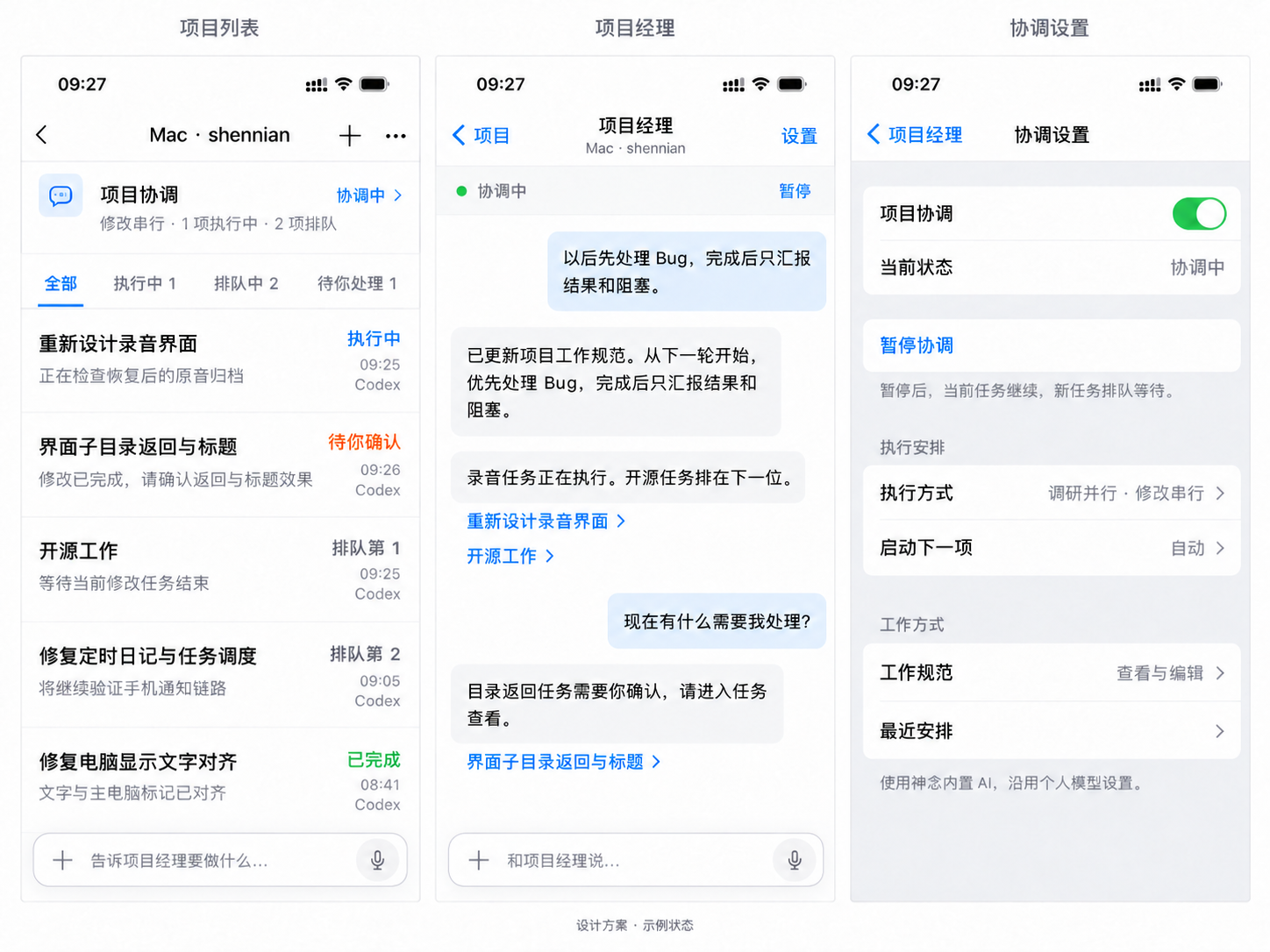
Open Project coordination at the top of a project, or send a request from its bottom composer. Filter all, running, queued, or needs-your-attention tasks. Follow task links in the coordinator conversation; handle real approvals and input requests inside the original task.
The candidate Client provides a local-only page for project queues, conversations, pasted screenshots, and files. Run shennian project open /absolute/project in a terminal and open the private URL in a browser on that computer. Client keeps working after the browser closes; obtain a new URL after Client restarts. Connection and shared-queue reads have been checked on the local page. Use a Client preview that supports project coordination.
Choose serial execution, parallel research with serial changes, or unrestricted concurrency in coordination settings. Pause or resume coordination and edit project instructions. You can also request lasting changes in conversation; the coordinator reports successful saves. Only read-only sessions that cannot escalate to writes use research concurrency; sessions that can request write approval use a modification slot. Pausing coordination leaves the current worker running and new work queued.
Client records the queue and instructions in the execution computer’s Shennian directory. Workers do not maintain duplicate task documents. If the computer is offline, submission fails and you can retry with your input preserved. A task is queued only after Client confirms receipt.
Read about coordination with General Loop →Open Discover from Contacts in the mobile app to browse or search AI that owners have listed publicly. Read profiles and computer status, then connect or start a conversation according to availability and access settings.
Owners control “Show in Discover” in AI card settings. Listing and external conversation availability have separate states; check the current status in the profile.
Keep frequently used people and AI in Contacts. Connect through profiles, QR codes, AI links, or Discover. If approval is required, wait for approval before using that entry.
AI profiles show a name and introduction. Owners manage adding and approval settings. Room invitations, AI profiles, and computer-sharing invitations each grant different kinds of access.
Computer sharing requires trust at the computer level: AI may read files, execute commands, and access networks under its runtime permissions. Invite trusted people; use separate computers or environments for work with different confidentiality needs.
The mobile app supports text, voice, and attachment controls in applicable conversations. Give instructions by voice or send images and files for AI to handle according to its actual capabilities.
Available controls and file types depend on the conversation. Attachment support in mobile, rooms, and public AI web pages is separate; support in one place does not imply support everywhere.
Use the official Client upgrade flow. Deleting configuration or pairing again is not a general fix. Keep the version and error description when asking for help; keep verification codes, keys, and sign-in files on your computer.
Read installation and troubleshooting steps →Contact official support →If installation, pairing, or an AI connection fails, continue troubleshooting yourself or contact the Shennian team. Asking for help is optional and is not a condition for completing setup or continuing to use Shennian.
Ask the Shennian support AI →Contact the Shennian team or official community →You can tell an AI with the Shennian Skill: “Contact Shennian support about this connection issue.” It can send a sanitized summary, read replies, and help you continue. It sends only when you explicitly ask, does not report connection failures automatically, and does not require all other agents to be connected. Client must already be paired and signed in; otherwise use the web support or team contact links above.
Skill-based support sends to the official community room using your human identity, where other members may see the message. Share versions, symptoms, and sanitized error summaries, keeping keys, verification codes, private files, and full logs out. A web support AI reply does not mean a human has confirmed the issue; use team contact channels such as WeCom when you need human help.
When choosing AI, directories, and runtime permissions, review which files and tools it can access. Project conversations, rooms, public AI visitor conversations, and shared computers each have their own access scope.
Owners can view their public AI’s visitor conversations, and room members can see content shared in the room. AI providers process model requests under their service rules. See the privacy policy for data details.
Read the privacy policy →Join the room to talk with us and other users.
Join the official Shennian room ↗Scan the code to contact the Shennian team.
